Skip to content
Dayclipse

Sun & Moon tracker for Android and iOS

Know the light before you step outside.

Dayclipse shows sunrise and sunset, golden and blue hour, twilight, Moon phases and moonrise for tens of thousands of cities worldwide — calculated right on your phone.

Explore every feature
Dayclipse home screen for New York: next event Sunset at 6:10 PM in 20 minutes, evening golden hour with the Sun 3.2° above the horizon, a sky scene with the Sun and Moon, and the day timeline.

Actual app screen · New York during evening golden hour

Why Dayclipse

The whole day's sky, in one calm place.

Dayclipse turns established astronomical calculations into something you can read at a glance.
  • Plan around the light

    Sunrise, sunset, golden hour, blue hour and every twilight phase for the place and date you choose.

  • Understand tonight's Moon

    Phase and illumination, moonrise and moonset, where it sits in the sky and a calendar of the month ahead.

  • Calculated on your phone

    The astronomy and the world city list are built in, so you can read the sky without a signal.

  • Find them in the real sky

    Compass-aware dials and AR Sky View point you toward the Sun and Moon on phones with the right sensors.

Features

Everything the sky is doing, one tap away.

Real screens from the app, shown for New York during an October evening golden hour.

Live sky

See the sky right now — and what's next

The home screen shows a live sky scene for your chosen city, with the Sun and Moon in their calculated positions and a sky color that follows the Sun's real altitude.

  • The next sky event with a live countdown
  • Current period, such as daylight or evening golden hour
  • A day timeline you can drag to preview any time
  • Step through days or pick a date up to two years ahead
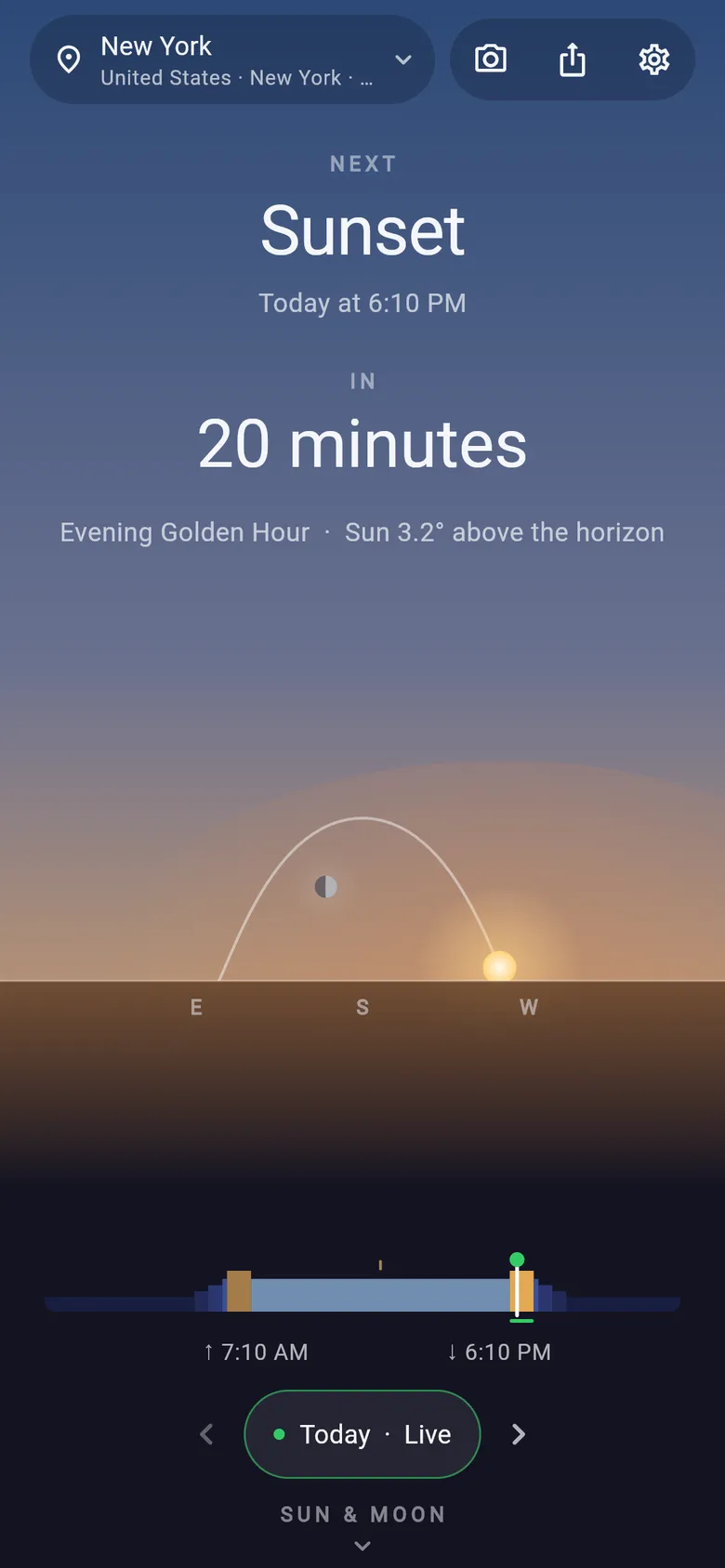
Dayclipse home screen for New York: next event Sunset at 6:10 PM in 20 minutes, evening golden hour with the Sun 3.2° above the horizon, a sky scene with the Sun and Moon, and the day timeline.

The Sun

Sunrise, sunset, golden hour and blue hour

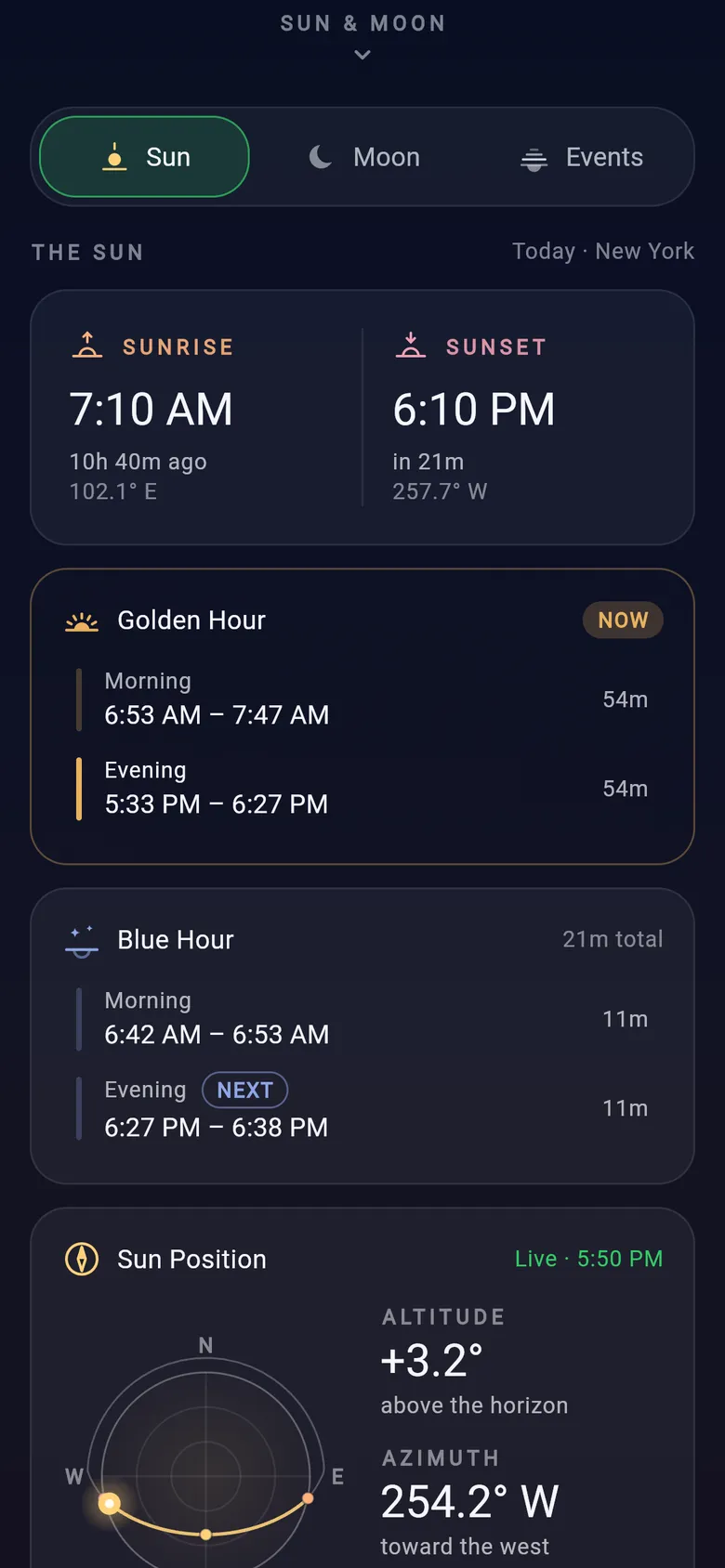
Open the Sun tab for the times that shape your day: sunrise and sunset, morning and evening golden hour, blue hour, solar noon and total daylight.

  • Golden hour: Sun between −4° and +6°
  • Blue hour: Sun between −6° and −4°
  • Solar noon with the Sun's maximum altitude
  • Live Sun altitude and azimuth

Times assume an ideal flat horizon; hills, buildings and weather can change what you actually see.

Dayclipse Sun tab: sunrise 7:10 AM and sunset 6:10 PM, morning and evening golden hour windows, blue hour windows and the Sun Position card.

The Moon

Moon phase, moonrise and moonset

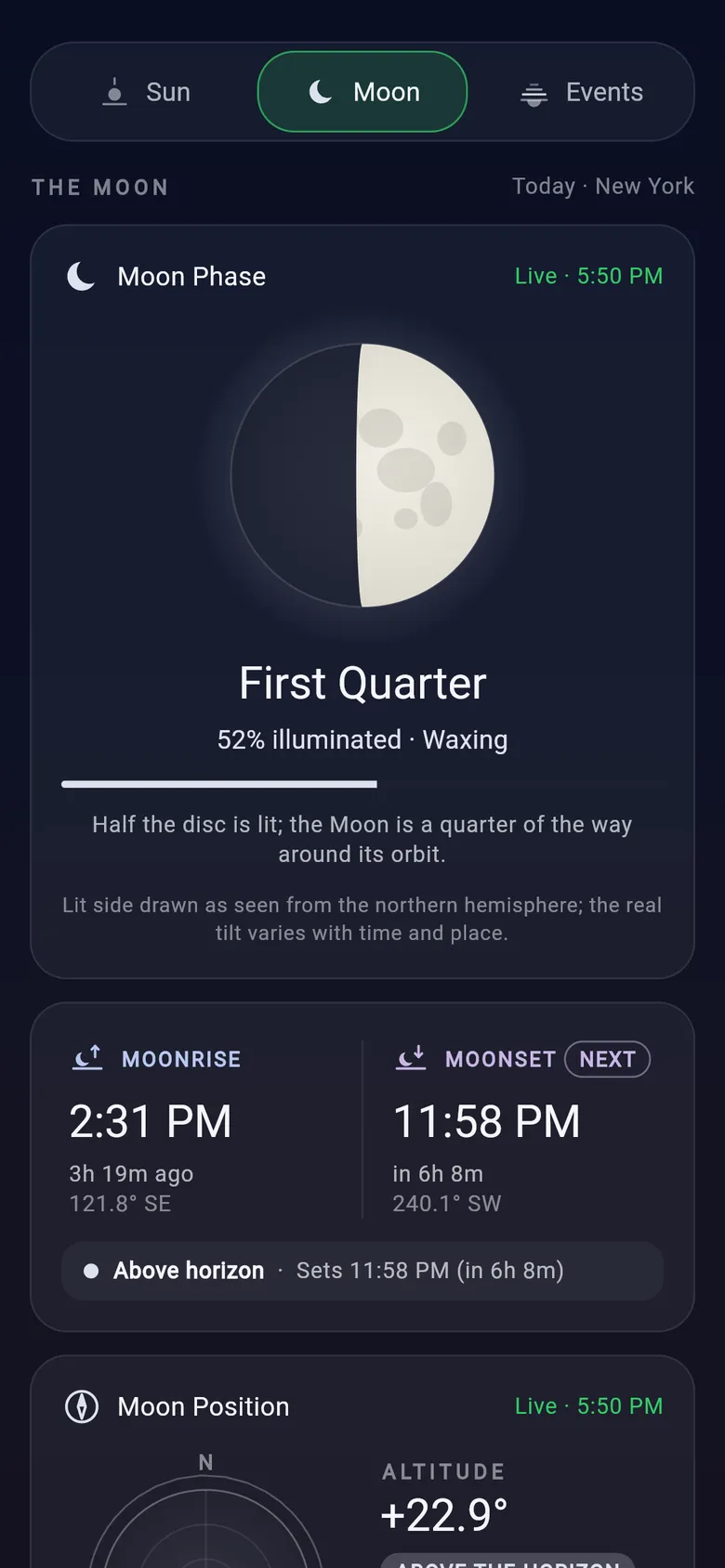
The Moon tab explains tonight's Moon: its phase and illumination, when it rises and sets, where it is in the sky and how its altitude changes through the day.

  • Phase name, % illuminated, waxing or waning
  • Upcoming new, quarter and full Moon times
  • Moon age and Earth–Moon distance
  • A monthly lunar calendar and a simple observing guide

The observing guide is based on geometry only — it doesn't know about clouds or terrain.

Dayclipse Moon tab: First Quarter Moon, 52% illuminated and waxing, with moonrise at 2:31 PM and moonset at 11:58 PM.

Sky events

Every twilight phase, in one timeline

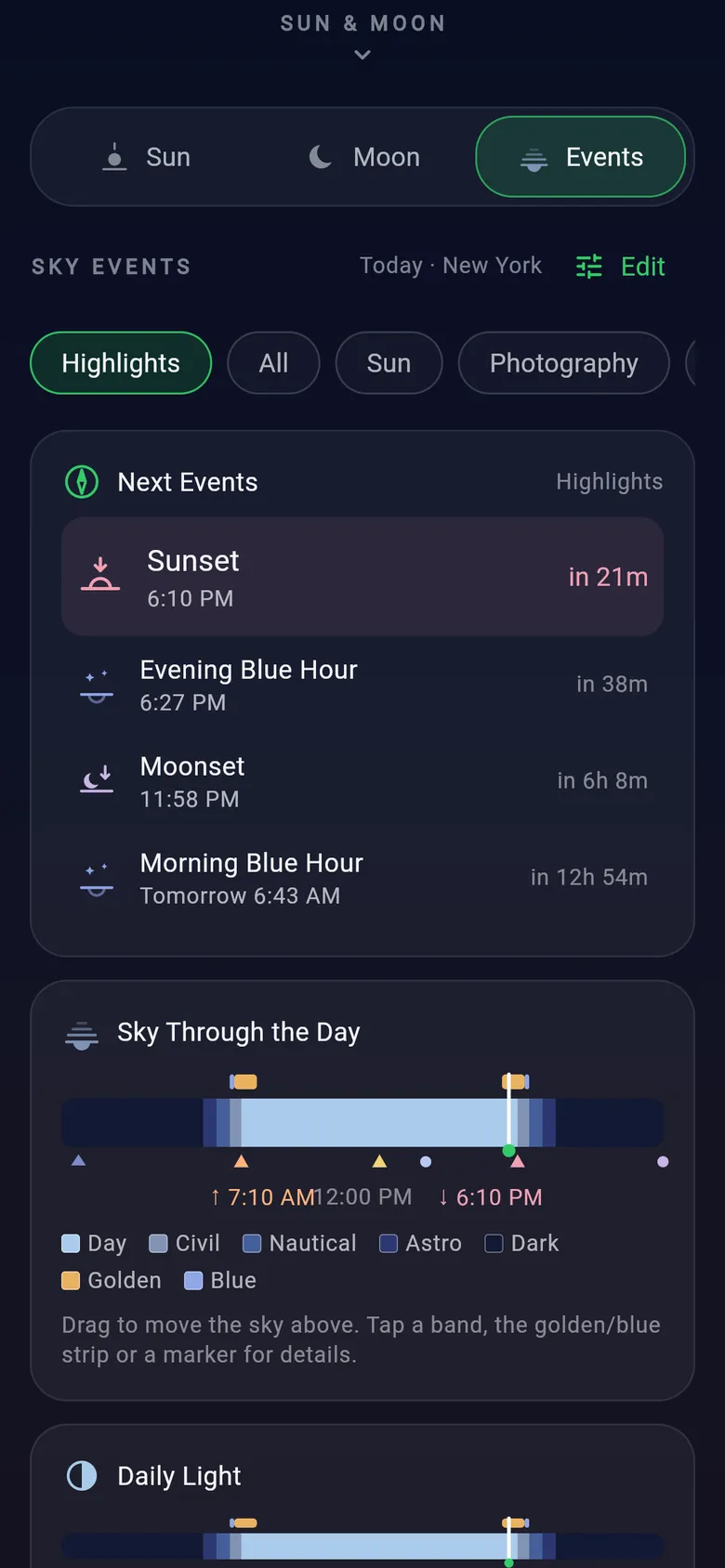
The Events tab lists the day's sky events in order and draws them on a layered timeline — daylight, civil, nautical and astronomical twilight, darkness, golden and blue hour.

  • Next events at a glance
  • Filter by Highlights, Sun, Moon, Twilight or Photography
  • Daily totals for daylight, night and darkness
  • Choose and reorder what you see
Dayclipse Events tab: filter chips, the next events list and the Sky Through the Day timeline with day, civil, nautical, astronomical, golden and blue bands.

Photography planner

A simple planner for golden and blue hour

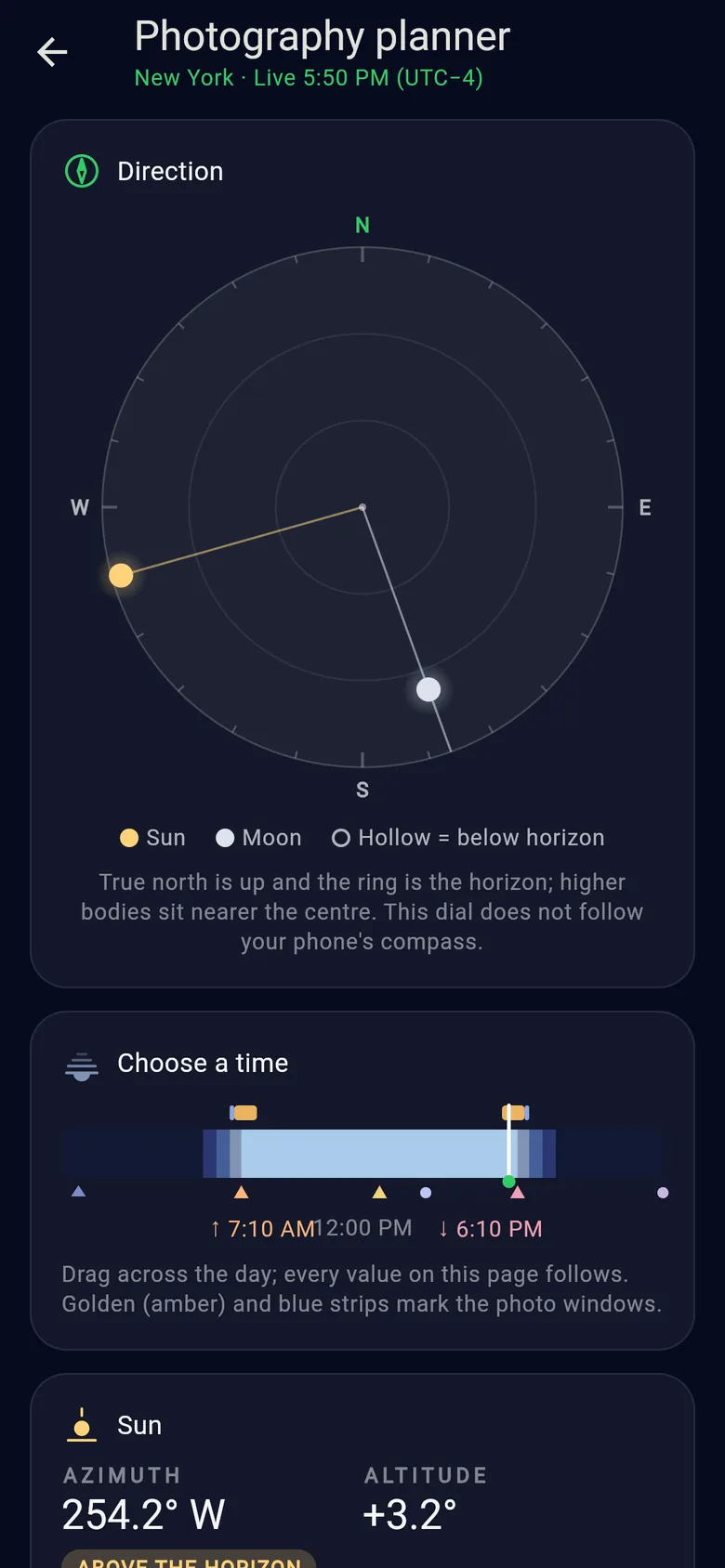
The photography planner puts the Sun and Moon on a true-north direction dial, lets you drag through the day, and lists the golden and blue hour windows for the selected date.

  • Sun and Moon azimuth and altitude
  • Time slider with golden and blue hour strips
  • Next sunrise, sunset or solar noon
  • Moon phase, moonrise and moonset

Dayclipse doesn't model terrain, clouds or haze, and doesn't suggest lenses or exposure settings.

Dayclipse photography planner: a true-north direction dial showing the Sun in the west and the Moon in the south, and a time slider with golden and blue hour strips.

One angle, every kind of light

The day is measured in degrees.

Golden hour, blue hour and each phase of twilight are defined by how far the Sun sits above or below the horizon. These are the exact altitude ranges Dayclipse uses to name each part of your day.
Golden hour+6° to −4°
Low, warm, directional sunlight around sunrise and sunset.
Blue hour−4° to −6°
The Sun is just below the horizon and the sky glows deep blue.
Civil twilight0° to −6°
Usually bright enough outdoors without lights; the brightest planets appear.
Nautical twilight−6° to −12°
The horizon fades from view; many stars are visible.
Astronomical twilight−12° to −18°
The last trace of sunlight leaves the sky.
Astronomical darknessbelow −18°
The Sun no longer brightens the sky at all.

Sunrise and sunset use the standard −0.833° criterion, which accounts for atmospheric refraction and the size of the Sun's disc.

Sunrise and sunset (Sun center at −0.833°)Diagram of Sun-altitude definitions — not live data.

How it works

Three steps from a city name to the sky above it.

No account, no setup and no location permission. Dayclipse opens straight to a live view of the place you pick.
  1. 01

    Choose a place

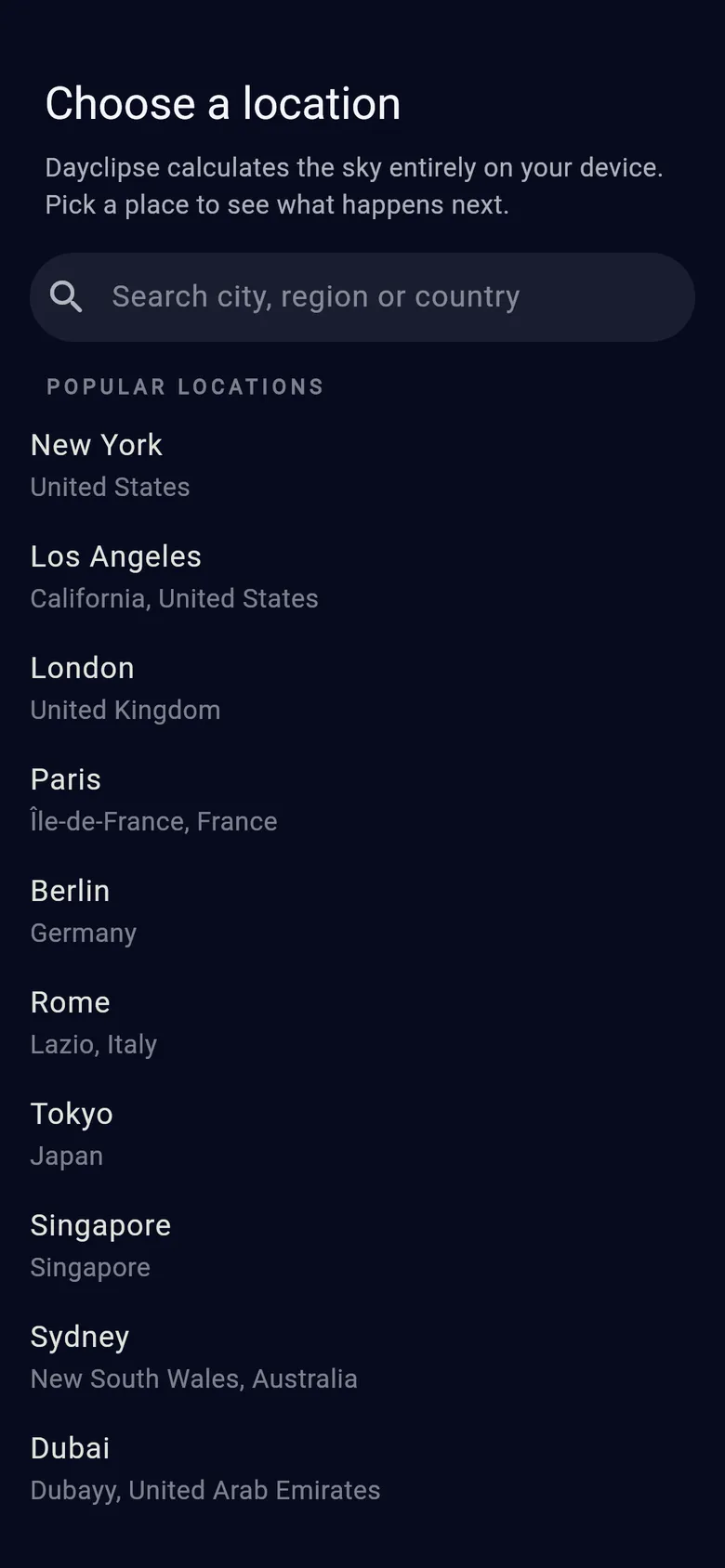
    On first launch, search for a city, region or country — or tap a popular location. The list is built in, so it works offline. You can change places or star favorites at any time.

    Dayclipse Choose a location screen with a city search field and popular locations such as New York, London and Tokyo.
  2. 02

    Read the live sky

    The home screen shows the next event with a countdown, the current period of light and a sky scene with the Sun and Moon. Drag the timeline to preview other times, or step to another date.

    Dayclipse home screen for New York: next event Sunset at 6:10 PM in 20 minutes, evening golden hour with the Sun 3.2° above the horizon, a sky scene with the Sun and Moon, and the day timeline.
  3. 03

    Go deeper when you need to

    Scroll down for the Sun, Moon and Events tabs. From the top bar, open the photography planner, share a sky card, or adjust settings.

    Dayclipse Events tab: filter chips, the next events list and the Sky Through the Day timeline with day, civil, nautical, astronomical, golden and blue bands.

Made for everyday skies

Who Dayclipse is for.

  • Evening walks and outdoor plans

    Check sunset and how long civil twilight lasts before heading out for a run, a hike or a beach evening.

  • Hobby photography

    See when golden hour and blue hour start and end, and which direction the Sun will be in, before you pick up the camera.

  • Moon watching

    Find out tonight's phase, when the Moon rises and sets, and how well placed it is — then use AR Sky View to spot it.

  • Travel across time zones

    Look up your destination before you arrive. Every time is shown in that place's own time zone, even when you're offline.

Dayclipse is an everyday sky companion. It isn't a navigation, safety or professional survey tool, and it doesn't include weather forecasts.

Offline & privacy

Your sky is calculated, not downloaded.

Dayclipse keeps working without a signal — on a trail, at the beach or in flight mode — because everything it needs to calculate the sky ships inside the app.
  • Astronomy runs on your phone

    Sun and Moon positions, times and phases are calculated locally — no internet connection needed.

  • No GPS, no location permission

    You choose a city from the built-in list. Your selected places and favorites stay on your device.

  • No account

    There's nothing to sign up for. Settings are saved on your device.

  • Camera only for AR Sky View

    The camera preview is used live and never recorded or saved.

What does use the network

When you're online, Dayclipse uses Google Firebase Analytics for basic usage statistics and Firebase Crashlytics for crash reports. These services receive device and app information, not your chosen cities. Read the Privacy Policy.

FAQ

Questions, answered.

All frequently asked questions

What is Dayclipse?

Dayclipse is a Sun and Moon tracker for Android and iOS. Pick a city and it shows sunrise and sunset, golden hour and blue hour, civil, nautical and astronomical twilight, the Moon's phase, moonrise and moonset, and where the Sun and Moon are in the sky — for today or a future date.

See all features

Does Dayclipse work offline?

Yes. All Sun and Moon calculations run on your phone, and the city list and time-zone data are built into the app, so you can search places and read the sky without a connection. When a connection is available, the app may send basic usage statistics and crash reports through Google Firebase.

Read the Privacy Policy

Does Dayclipse use GPS or track my location?

No. Dayclipse doesn't use GPS or ask for location permission. You choose a city from the built-in list, and the selected city and your favorites are stored only on your device.

How does Dayclipse define golden hour and blue hour?

By the Sun's altitude. Golden hour is when the Sun is between 4° below and 6° above the horizon; blue hour is when it is between 6° and 4° below the horizon. Dayclipse shows both the morning and evening windows for the selected date.

Golden hour vs blue hour

How accurate are the times and positions?

Dayclipse uses established astronomical algorithms (based on Meeus and NOAA methods) with standard atmospheric refraction. Results are calculated for an ideal flat horizon at the city's coordinates, so local terrain, buildings, elevation, weather and unusual atmospheric conditions can shift what you actually observe by a few minutes. Treat times as close estimates, not guarantees.

How sunrise times are calculated

Is Dayclipse available for Android and iPhone?

Yes. Dayclipse is available for Android on Google Play and for iPhone on the App Store. Use the download buttons on this site to open the store listing.

Carry the whole sky in your pocket.

Sunrise to moonset, golden hour to astronomical darkness — for cities worldwide, calculated on your phone.